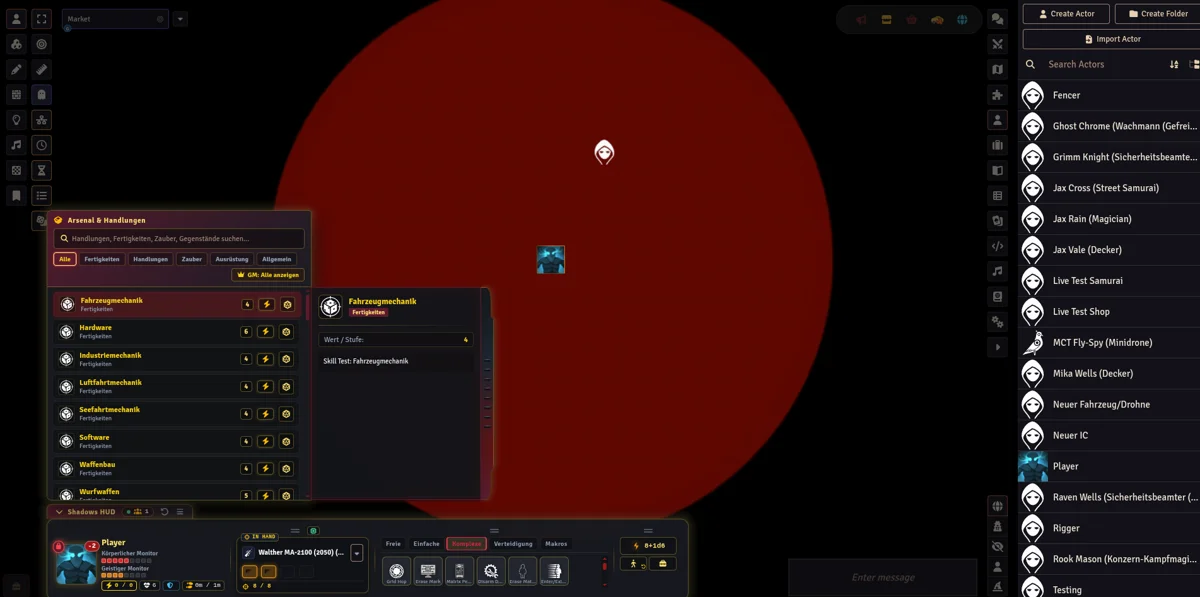
Shadows Combat HUD


A feature-rich cyberpunk Heads-Up Display (HUD) for Foundry VTT, engineered specifically for the Shadowrun 5e (shadowrun5e) system. Inspired by high-tech cyberpunk marketplace themes, Shadows Combat HUD transforms tabletop combat into a seamless, fast-paced tactical experience by bringing your character's arsenal, biomonitor, spells, matrix attributes, movement, and actions directly onto the main canvas.
🌟 What Shadows Combat HUD Brings to the Table
🎯 In-Hand Arsenal & Smart Weapon Management
- In-Hand Active Weapon Card: Display your currently selected firearm or melee weapon with dynamic ammo bullet arrays, reload buttons, and fire mode indicators.
- Instant Firing Mode Switching: Toggle between Single Shot (SS), Semi-Automatic (SA), Burst Fire (BF), and Full Auto (FA) with dedicated icon controls that automatically adapt recoil and bullet expenditure.
- Automated Weapon Equip Sync: Equipping a new weapon automatically unequips secondary weapons on your character sheet, keeping your active inventory clean and accurate.
- Quick-Select Weapon Popup: Right-click or click the selector caret to open a popover arsenal list to swap weapons or prepare spells on the fly.
🩸 Biomonitor & Condition Monitoring
- Real-Time Physical & Stun Monitors: Live condition pips for Physical and Stun damage tracks that update instantly during combat.
- Wound Penalty Calculation: Automatic display of current wound penalties (
-1, -2, -3, etc.) derived from your damage tracks. - Edge Spending & Defense: Quick-click Edge point spending (Seize the Initiative) and instant physical damage resistance test triggers with synchronized audio grunts.
- Temporary Effects & Armor: Active status effects bar, armor rating, and essence tracker.
-1, -2, -3, etc.) derived from your damage tracks.🔮 Magic, Matrix & Subsystem HUD Modules
- Cyberdeck & Rigger Decking: Compact 2-line Matrix ASDF display (
Attack / Sleaze / Data Processing / Firewall) with Hot-Sim, Running Silent indicators, and program shortcuts. - Spellcasting & Power Points: Dedicated Magic module tracking
MAG / Drain / Spells, initiation ranks, adept power points, and spirit summon shortcuts.
Attack / Sleaze / Data Processing / Firewall) with Hot-Sim, Running Silent indicators, and program shortcuts.MAG / Drain / Spells, initiation ranks, adept power points, and spirit summon shortcuts.🏃 Movement Gauge & One-Click Undo
- Tactical Movement Gauge: Real-time distance bar tracking walking and running speed allowances as tokens move across the grid.
- Movement Undo (
Ctrl+Z): Reset token position and movement allowance with a single click or keyboard shortcut.
Ctrl+Z): Reset token position and movement allowance with a single click or keyboard shortcut.⚡ Categorized Action Bar & Arsenal Drawer
- Action Speeds: Dedicated tabs for Free (
Freie), Simple (Einfache), Complex (Komplexe), Interrupt (Verteidigung), and Macros. - Compendium Action Integration: Automatically merges your character's actions with standard system compendium actions.
- Full Slide-Out Drawer: Access all character skills, inventory gear, and actions in a slide-out cyberpunk datapad drawer with live search and category filtering.
Freie), Simple (Einfache), Complex (Komplexe), Interrupt (Verteidigung), and Macros.👥 Active Players & Performance Monitoring
- Integrated Player Status Pill: Top bar status pill showing live player counts and real-time canvas FPS performance (
60 FPS). - Player Popup & AFK Detection: Displays connected players with custom user colors, GM badges, and automatic AFK status detection after 60 seconds of inactivity. Click any player to pan the camera and ping their character token.
60 FPS).🎯 GM Target Locking & Combat Controls
- GM Target Lock (
🔒): Keep the HUD focused on a target actor while managing multiple combatants. - Frameless Crosshair Target Button: Centered red glowing target crosshairs HUD button for fast attack rolls against selected tokens.
- Initiative & Pass Cycling: Clickable initiative pill showing formulas (e.g.
8+1d6) or active combat scores (⚔️ 14 · Pass 1) with Next Turn (⏭️) and Next Pass (⏩) controls.
🔒): Keep the HUD focused on a target actor while managing multiple combatants.8+1d6) or active combat scores (⚔️ 14 · Pass 1) with Next Turn (⏭️) and Next Pass (⏩) controls.🔊 Audio & Sound FX Integration
Shadows Combat HUD features synchronized audio feedback for weapon draws, gunshot bursts, spellcasting, damage resistance tests, and HUD interactions.
For the best audio experience, we recommend using the Game Audio Bundle modules created by datdamnzotz:
gAudioBundle-1gAudioBundle-2gAudioBundle-3gAudioBundle-4
Note: If audio modules are not installed or active, the HUD operates silently.
🙏 Credits & Acknowledgments
- Inspiration: Special thanks and credit to TheRipper93 for the visual and structural inspiration derived from his incredible Argon Combat HUD module for Foundry VTT. Visit his website at theripper93.com for more premium Foundry VTT modules and tools!
- Game Audio: Thanks to the datdamnzotz of the Game Audio Bundle modules for providing sound FX used in audio pipelines.
- System: Built for the Shadowrun 5e system for Foundry VTT (
shadowrun5e).
shadowrun5e).💬 Community
Join our community on Discord to share feedback, report issues, ask questions, or join the discussion:
- 💬 Shadow Plays Discord: https://discord.gg/r4are6M9Q
📜 License & Disclaimer
This project is licensed under the MIT License.
Note
Fan-Created Unofficial Content:
Shadows Combat HUD is an unofficial, fan-made module developed for the Shadowrun tabletop gaming community. This module is not affiliated with, endorsed, sponsored, or approved by Catalyst Game Labs or The Topps Company, Inc.
All Shadowrun trademarks, logos, universe references, and game mechanics are copyright © The Topps Company, Inc. and Catalyst Game Labs.