Shadows Dossier




Shadows Dossier turns your Foundry VTT world into an interactive mission briefing, investigation, and payout hub for Shadowrun 5e—built directly on top of Campaign Codex and SR5 Marketplace.
Prepare runs and sprawl lore in Foundry or import complete campaigns straight from Obsidian, track legwork tests and security ratings, share spoiler-safe dossiers with your players, and pay out Karma and Nuyen with a single click.
What It Adds to Your Game
- Mission & Dossier Cards Enrich Campaign Codex sheets with Shadowrun run details: mission status, clearance level, physical security and Matrix host ratings, Karma and Nuyen rewards, bonus gear or vehicles, and direct links to SR5 Marketplace shopkeepers.
- One-Click Team Payouts Distribute Nuyen and Karma rewards cleanly across selected runner characters—either split evenly or awarded per runner—and transfer earned reward items directly into character inventories.
- Action Items & Unlockable Clues Add legwork tasks, Matrix searches, and infiltration obstacles tied to Shadowrun 5e skills, thresholds, and extended-test intervals. Players can roll checks right from the dossier sheet, track party progress toward unlocking hidden clues or secret blocks, and promote leads straight to Quest Objectives.
- Spoiler-Safe Record Snapshots & GM Secrets Drop clean preview cards of Contacts, Corporations, Gear, Vehicles, and Locations into any journal page, share cards into chat, and keep GM-only secrets hidden until players earn the hits or you choose to reveal them.
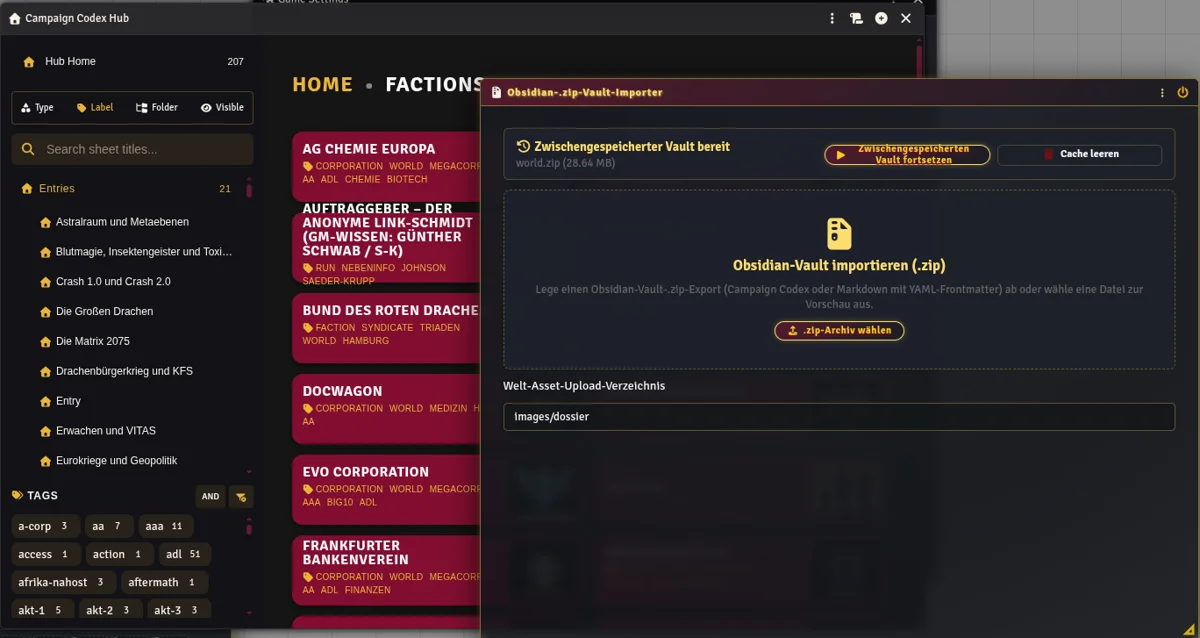
- Obsidian Vault & Run Importer
Import entire Obsidian
.ziparchives—both persistent world lore and individual shadowrun adventures—straight from Module Settings. Notes, folders, artwork, portraits, quests, cross-references, secrets, action checks, and missing Contact actors are set up for you automatically.
Requirements
- Foundry VTT (Version 14 or newer)
- Shadowrun 5e game system (
0.37.0or newer) - Campaign Codex module
- SR5 Marketplace module
Getting Started
- Enable the Modules: In your Foundry VTT world, open Manage Modules and activate Shadows Dossier along with Campaign Codex and SR5 Marketplace.
- Check Your Settings: Open Game Settings → Configure Settings → Shadows Dossier to choose where imported artwork is stored and how imported journals are organized into folders.
- Use Dossier Tools in Campaign Codex: Open any Campaign Codex sheet to fill in Dossier details, add Action Items, drop spoiler-safe record previews, or distribute mission payouts.
- Import an Obsidian Vault (Optional): Click the Obsidian Vault Importer button in Shadows Dossier settings, select your
.ziparchive, preview what will be created, and start the import.
Writing & Packaging Obsidian Vaults
Want to write your own Shadowrun runs, locations, corporations, or NPCs in Obsidian and bring them into Foundry VTT?
👉 Read the Obsidian Vault Authoring & Bundling Guide for:
- How to structure World Vaults and Run Vaults
- Copy-paste templates for new runs, locations, regions, corporations, and contacts
- How to write !action skill checks, hidden secrets, quests, and cross-vault links
- How to package your vault into a .zip with the included bundle script—or manually using a plain assets folder
Beta Status & Feedback
Shadows Dossier is currently in Beta and is not yet listed in the official Foundry VTT package directory.
Found a bug, rough edge, or idea for improvement? Please report issues and share feedback directly on Discord:

Languages
Included out of the box in English and Deutsch (supports both English and German skill & time names inside imported Obsidian notes).