🧙♂️ Shadows Creater - Shadowrun 5e Character Suite



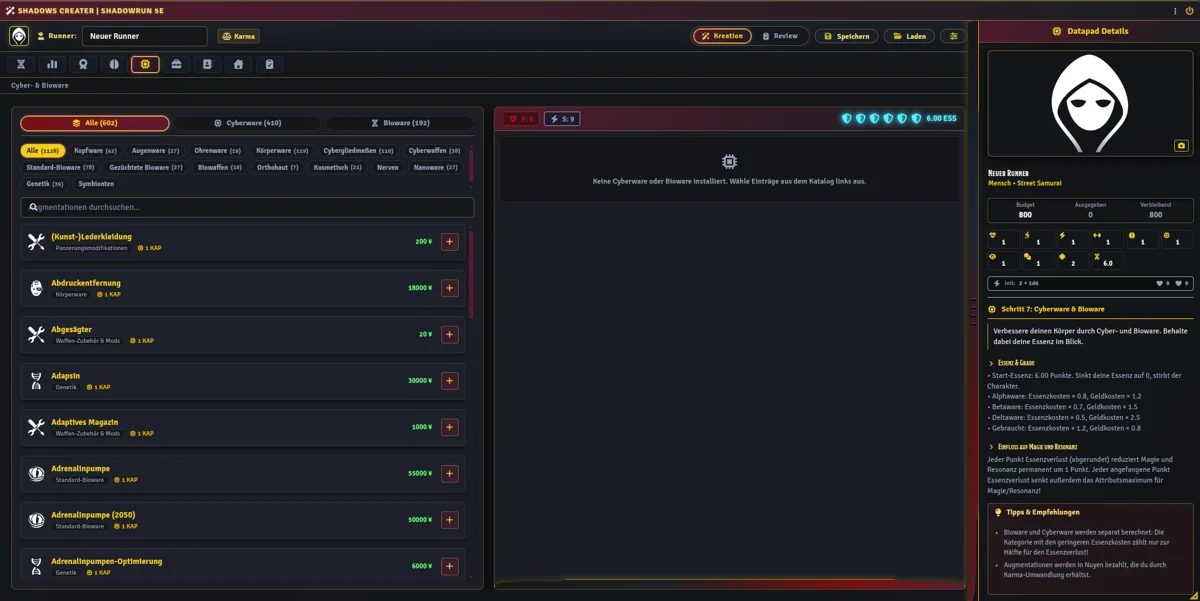
Shadows Creater is an advanced character creation, karma management, audit history, and GM review module for Foundry VTT v14 running the Shadowrun 5e (shadowrun5e) system.
It integrates directly with the shadowplays.de compendium gateway and the sr5-marketplace module to deliver a complete character generation and campaign progression pipeline.
🌟 Key Features
1. 📚 Chummer Data & Compendium Catalog
- Indexes your imported Chummer item compendiums and Foundry world data cleanly across creation and advancement tabs.
- Supports rich rule descriptions, item stats, sourcebook filtering, and automated ActiveEffects from your own Chummer imports and world compendiums (no copyrighted rulebook data is bundled with the module).
2. 🧬 Consolidated Race Item Standard
- Designed around the unified Race Item architecture where the base race and all of its metavariants are stored within a single item document.
- Includes built-in standard Shadowrun 5e metatypes (Human, Elf, Dwarf, Ork, Troll, and 15 metavariants) as out-of-the-box defaults.
3. ⚖️ Point-Buy Karma Creation Engine
- Flexible, rules-compliant Karma generation with configurable world settings:
- Starting karma budget (default:
800). - Customizable attribute step multipliers (default:
5). - Active skill multipliers (
2) and Skill group multipliers (5). - Free knowledge skills pool calculation (
(LOG + INT) * 2). - Positive quality caps (
25) and Negative quality bonus caps (25). - Karma-to-Nuyen conversion (
1 Karma = 2,000 ¥, max25 Karma). - Real-time audit report validating racial bounds, attribute maximums, and karma balances.
4. 📁 Hidden Creation Lifecycle
- Draft characters are automatically placed into a dedicated hidden folder named
creator. - Characters under creation are isolated and hidden from the Actor sidebar.
- The creating player maintains full OWNER permissions on the draft actor throughout creation.
5. 🛡️ GM Review & Approval Workflow
- Players submit completed character drafts for review via Foundry VTT sockets.
- The GM receives interactive review Chat Cards.
- The GM inspection window allows:
- Request Rework: Send the character back with personalized feedback notes.
- Approve Character: Select the target destination folder (or Root) where the character will be moved, unhidden, and finalized.
6. 📜 Actor Sheet Subclassing & History Ledger
- Extends
CONFIG.Actor.sheetClasses.characterusing the provenshadows-backpacksubclassing pattern (no fragilerenderActorSheethooks). - Injects a dedicated History tab directly into the character sheet.
- Complete chronological audit log of all Karma spent/received and Nuyen spent/received with before/after balances.
- Injects quick increment/decrement actions on Karma and Nuyen fields with reason prompts.
- Cross-module integration: Automatically logs equipment purchases from
sr5-marketplace.
7. 💾 Chummer5 JSON Import
- Integrates directly with the system's native importer (
game.shadowrun5e.CharacterImporter.import). - Imports Chummer
.jsonfiles in the background into the hiddencreatorfolder and runs theshadowplays.deitem enrichment pass automatically.
8. 📈 In-Game Level Up & GM Roster
- In-Game Level Up Dialog: Accessible from the character sheet, allowing players to spend earned karma on attributes or skills according to campaign rules.
- GM Campaign Roster: High-level dashboard for Gamemasters to review all runner statistics and reassign character ownership to players with a single click.
📦 Requirements & Dependencies
- Foundry Virtual Tabletop: Version 14 (verified)
- Game System:
shadowrun5e(>= 0.30.0) - Required Module:
sr5-marketplace
⚙️ Configuration & Setup
- Prepare your item catalogs by importing your Shadowrun 5e items and gear from Chummer (or providing your own populated Foundry VTT item compendiums).
- Enable Shadows Creater (and sr5-marketplace) in your Foundry VTT world.
- In Configure Settings → Module Settings → Shadows Creater:
- Data & Compendiums: Ensure your imported Chummer compendiums / item packs are indexed so gear, cyberware, qualities, spells, and metatypes appear in the builder.
- Karma & Level-Up Rules: Customize starting karma, step multipliers, negative quality rules, and conversion limits to match your table's house rules.
- Open the Character Creator from the Actor Directory sidebar button or via macro:
javascript
   game.modules.get("shadows-creater").api.openCreater();
📄 License
This project is licensed under the terms of the MIT License. Rule systems and trademarks are copyright The Topps Company, Inc. and Catalyst Game Labs.